# 配置文件
# 创建
在 odoo 的根目录创建文件 odoo.conf
1
2
3
4
5
6
7
8
9
10
11
12
13
14
15
16
17
18
| [options]
; 进入密码
admin_passwd=admin
; 主机名
db_host=localhost
; 数据库端口号
db_port=5432
; 数据库用户名
db_user=odoo
; 数据库密码
db_password=123456
; 指定要使用的数据库名
db_name=odoo
; 启动端口
http_port=8069
; addons模块的查找路径
addons_path=addons/,enterprise/
|
# 基础模块
房地产广告模块
首先看 odoo 是否提供了一种方法来回答特定的业务
- 创建模块
在根目录创建
1
2
3
4
5
| custom
|__estate
|__ __init__.py
|__ __manifest__.py
|
一个模块至少包含两个文件 manifest.py 和 init.py
manifest.py 是描述模块的不能为空,他唯一需要的字段是 “名称”
1
2
3
4
5
| {
'name': 'Estate',
'depends': ['base'],
}
|
重启 odoo 服务器前将 custom 文件夹加入到配置文件 addons-path
1
| addons_path=addons/,enterprise/,custom/
|
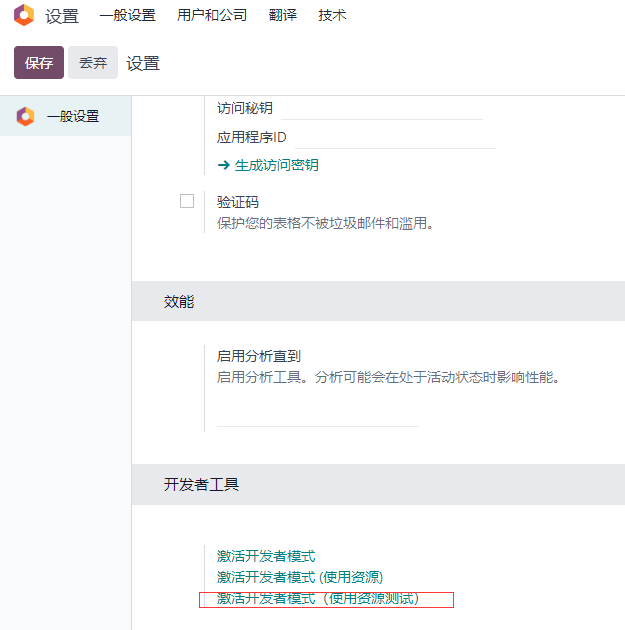
然后进入应用中搜索,如果没有请在设置中找到开发者工具 - 激活开发者模式 (使用资源测试)
![开发者]()
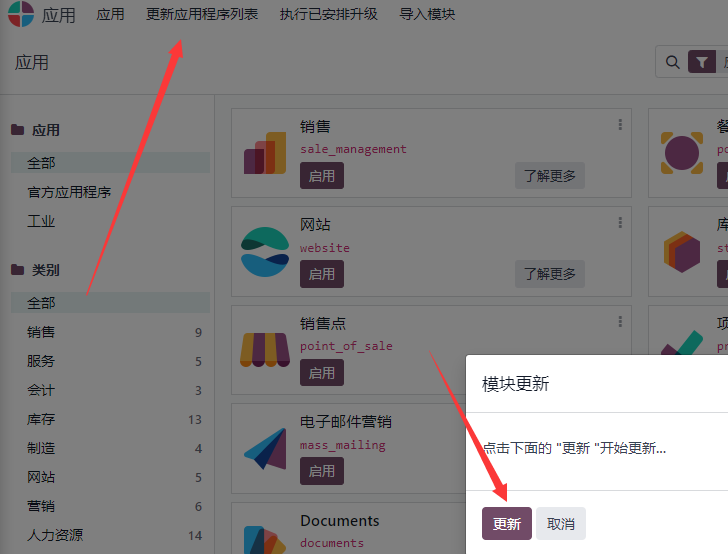
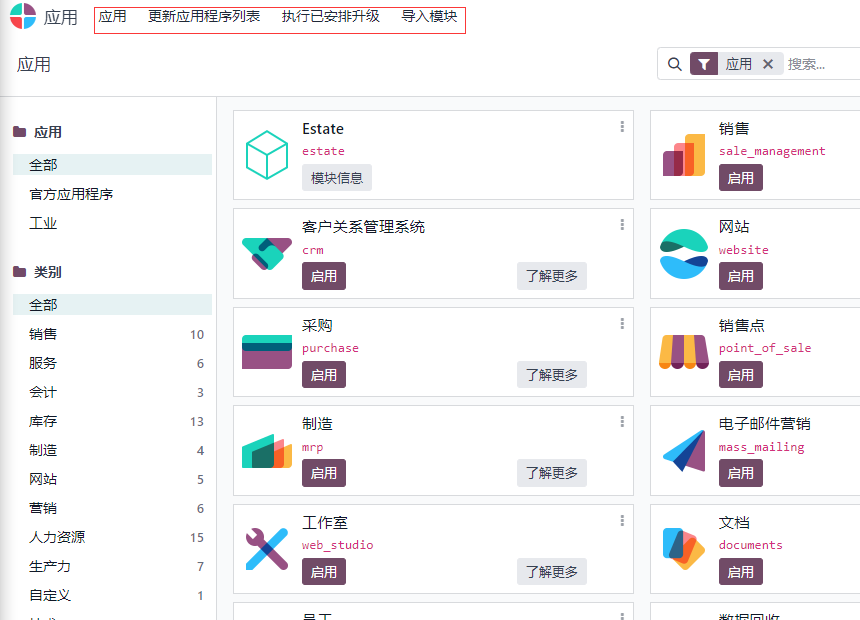
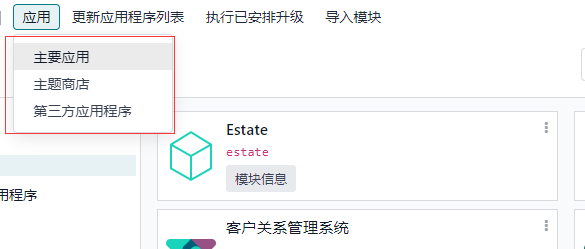
在点击 应用 ——> 更新应用程序列表 —— 更新
![开发者]()
把我们的模块启用
- 开发者模式
正常地址为
http:/localhost:8069/web#action=38&model=ir.module.module&view_type=kanban&cids=1&menu_id=54
开发者模式地址为
http:/localhost:8069/web?debug#action=38&model=ir.module.module&view_type=kanban&cids=1&menu_id=54
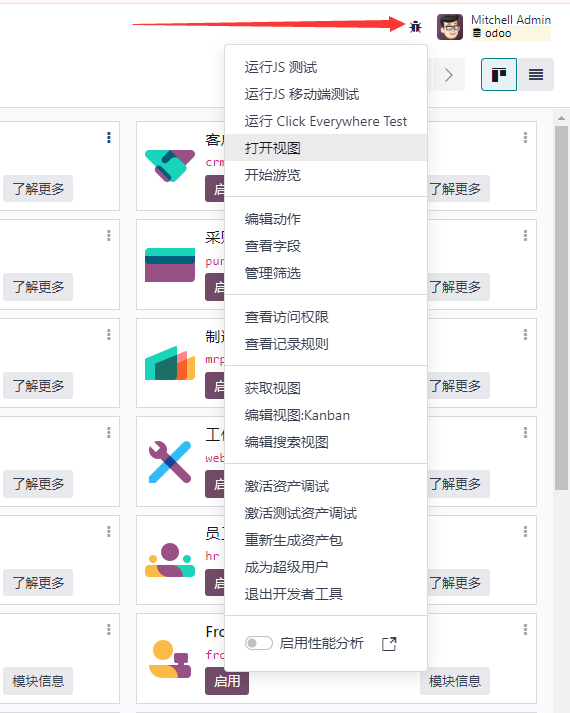
页面会多出一个调试
![调试]()
# 模型和字段
# 对象关系映射
Odoo 的一个关键组件是 ORM 层此层避免了手动编写大多数 SQL,并提供可扩展性和安全服务
ORM:自动转换为 sql 语言
在 estate 中创建子目录 model 存放模型文件
1
2
3
4
5
6
7
| custom
|__estate
|__ __init__.py
|__ __manifest__.py
|__ models
|__ __init__.py
|__ estate_model.py
|
init.py
1
| from . import estate_model
|
estate_model.py
1
2
3
4
5
| from odoo import api, fields, models
class EstateModel(models.Model):
_name = 'estate.model'
|
对 python 的任何更改都要重启 odoo 服务器
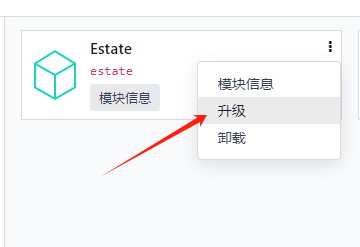
然后找到模块升级,升级才能生效
![升级]()
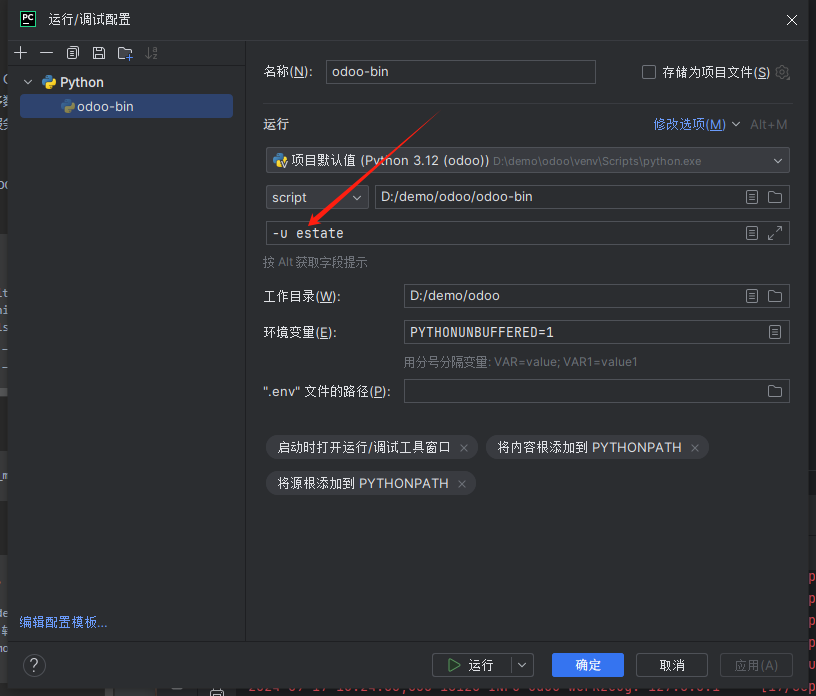
或者在启动配置里加 - u [模块]
![img_4.png]()
# 模型字段
estate_model.py
1
2
3
4
5
6
7
8
9
| from odoo import api, fields, models
class EstateModel(models.Model):
_name = 'estate.model'
_description = '房地产'
name=fields.Char(string='名称')
|
fields 里包含了数据类型
string 字段描述
在 estate 包下的__init__.py 引入 models
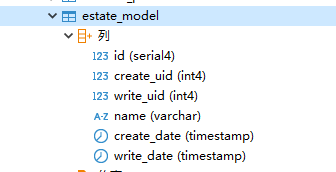
重启后安装就可以看到数据库中多了一张叫 estate_model 的表
就成功把类映射成数据表
![img_5.png]()
而除了 name 以外的字段为自动添加的字段
id (id)
模型记录的唯一标识符
create_date (Datetime)
记录的创建日期
create_uid (Many2one)
创建记录的用户
write_date (Datetime)
记录的上次修改日期
write_uid (Many2one)
上次修改记录的用户
添加完整字段
estate_model.py
1
2
3
4
5
6
7
8
9
10
11
12
13
14
15
16
17
18
19
20
21
22
| from odoo import api, fields, models
class EstateModel(models.Model):
_name = 'estate.model'
_description = '房地产'
name=fields.Char(string='名称', required=True)
description=fields.Text(string='描述')
postcode=fields.Char(string='邮政编码')
date_availability=fields.Date(string='可用日期')
expected_price=fields.Float(string='预期价格',required=True)
selling_price=fields.Float(string='销售价格')
bedrooms=fields.Integer(string='卧室')
living_area=fields.Integer(string='生活面积')
facades=fields.Integer(string='外观')
garage=fields.Boolean(string='车库')
garden=fields.Boolean(string='花园')
garden_area=fields.Integer(string='花园面积')
garden_orientation=fields.Selection(string='花园朝向', selection=[('north', '北'), ('south', '南'), ('east', '东'), ('west', '西')])
|
selection=[(‘north’, ‘北’), (‘south’, ‘南’), (‘east’, ‘东’), (‘west’, ‘西’)]
即选择时为’北’ 数据库保存为 ‘north’
常见属性
string (‘str’, 默认值字段名称)
ui 中字段的标签 (用户可见)
required (‘bool’, 默认值: false)
如果为 true, 则该字段不能为空,他必须有一个默认值,或者创建时给个值
help (‘str’, 默认值: ‘’)
在 ui 中为用户提供长格式的帮助工具
:attr:~odoo.fields.Field.index (‘bool’ , 默认值: False)
请求 Odoo 在列上创建一一个 "数据库索引"
# 安全性
Odoo 提供了 - - 种安全机制,允许特定用户组访问数据
即是否给特定的一类用户 增删改查 的权限
在 estate 下新建
security/ir.model.access.csv
1
2
| id,name,model_id/id,group_id/id,perm_read,perm_write,perm_create,perm_unlink
access_estate_model,access_estate_model,model_estate_model,base.group_user,1,1,1,1
|
- “id” 是外部标识符
- “name” 是访问权限的名称
- “model_id/id” 通过 “model_<model_name>” 的方式引用模型,其中 “<model_name>” 是模型的 “name”
- “group_id/id” 引用访问权限适用的组
- “perm_read,perm_write,perm_create,perm_unlink” 分别对应读、写、创建和取消链接权限
写完之后在 estate/manifest.py 中引入
1
2
3
4
5
6
7
8
9
10
11
12
13
14
15
16
17
18
| {
'name': 'Estate',
'version': '1.0',
'summary': 'estate 概要',
'description': 'estate 描述',
'author': 'douk',
'category': 'App',
'sequence': 1,
'auto_install': True,
'external_dependencies': {},
'license': 'LGPL-3',
'depends': ['base'],
'installable': True,
'application': True,
'data': [
'security/ir.model.access.csv',
],
}
|
数据文件按照它们在 manifest.py 文件中的顺序顺序加载这意味着如果数据’A’ 引用数据 "B"', 您必须确保’B" 在’A’之前加载
# UI 交互
菜单
odoo 有 3 级菜单
- 根菜单
![img_6.png]()
- 一级菜单
![img_7.png]()
- 二级菜单
![img_8.png]()
首先在 estate 下新建
views/estate_model_view.xml
1
2
3
4
5
6
7
8
9
10
11
12
13
14
15
16
| <?xml version="1.0" encoding="UTF-8" ?>
<odoo>
<data>
<record id="estate_model_action" model="ir.actions.act_window">
<field name="name">Estate Model</field>
<field name="res_model">estate.model</field>
<field name="view_mode">tree,form</field>
</record>
</data>
</odoo>
|
views/estate_model_menus.xml
1
2
3
4
5
6
7
8
9
10
11
| <?xml version="1.0" encoding="UTF-8" ?>
<odoo>
<data>
<menuitem id="estate_model_root" name="Estate">
<menuitem id="estate_model_level_menu" name="Estate_Property">
<menuitem id="estate_model_menu_action" action="estate_model_action"/>
</menuitem>
</menuitem>
</data>
</odoo>
|
action=“estate_model_action”
跳转到视图 estate_model_action
引入到__manifest__.py 的 data
1
2
3
4
5
| 'data': [
'security/ir.model.access.csv',
'views/estate_model_views.xml',
'views/estate_model_menus.xml',
],
|
最后重启就能看见
![ab]()
# 软删除
- 在模型中添加字段
estate_model.py
1
| active=fields.Boolean(string='激活', default=True)
|
重新启动
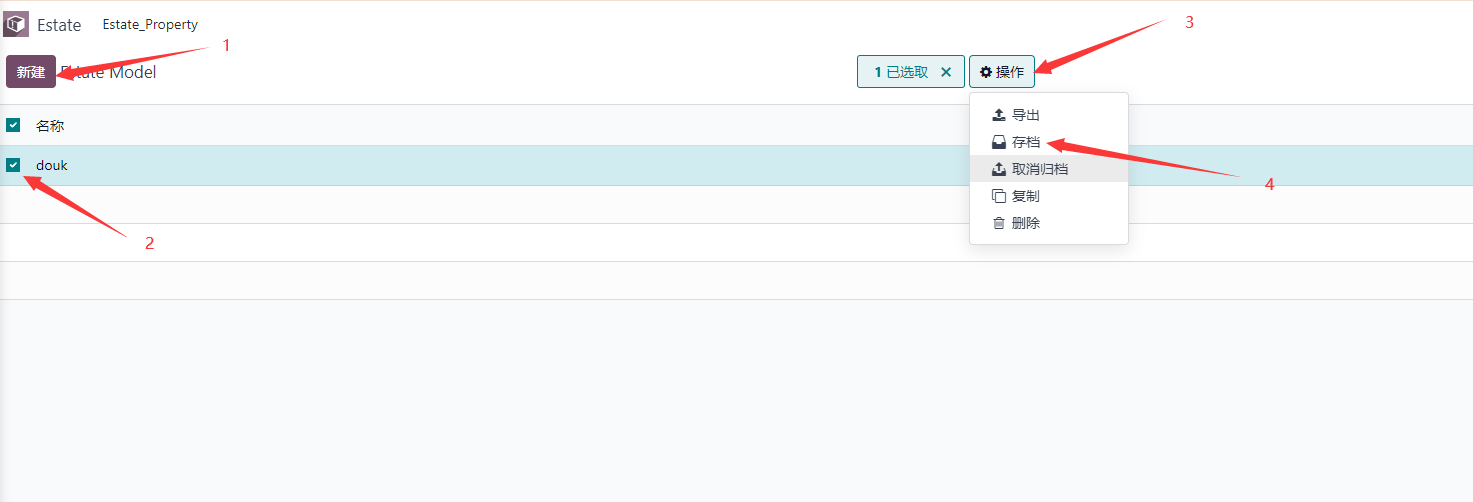
- 软删除操作
![img_10.png]()
我们新建一条数据 选中 操作 存档
最后就会发现数据被软删除了
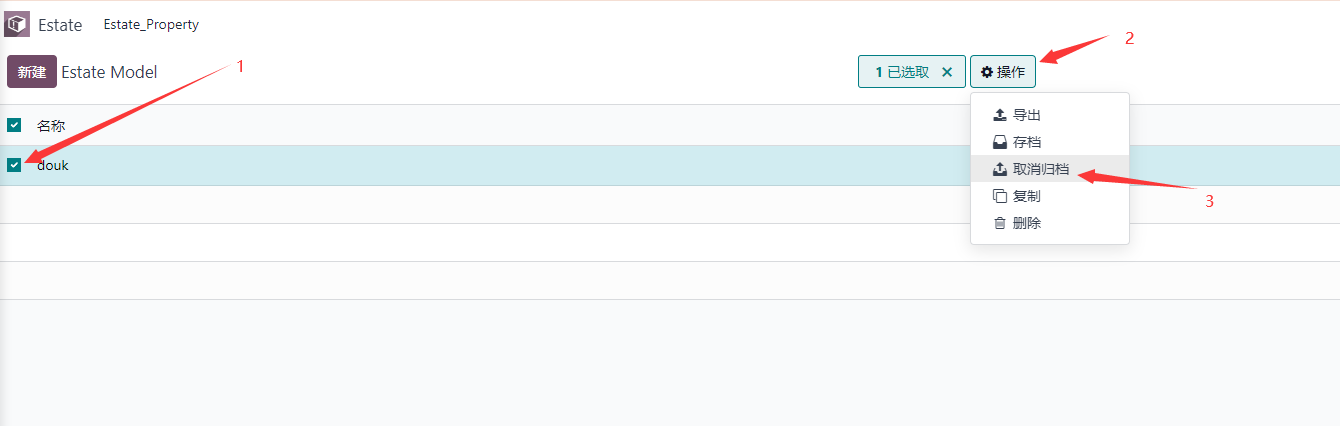
- 恢复
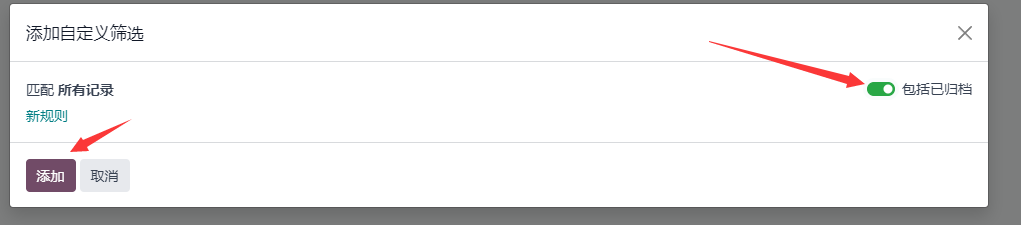
![img_11.png]()
![img_12.png]()
![img_13.png]()
# 状态
estate_model.py 中添加字段
1
| state=fields.Selection(string='状态', selection=[('new', '新建'), ('offer', '报价'), ('sold', '已售'), ('cancel', '取消')], default='new')
|
# 基本视图
# 列表视图
列表视图,也称为树视图,以表格形式显示记录。
把要加的字段加上
views/estate_model_view.xml
1
2
3
4
5
6
7
8
9
10
11
12
13
14
15
16
17
18
19
20
21
22
23
24
25
26
27
28
29
30
31
32
33
| <?xml version="1.0" encoding="UTF-8" ?>
<odoo>
<data>
<record id="estate_model_view_list" model="ir.ui.view">
<field name="name">Estate Model</field>
<field name="model">estate.model</field>
<field name="arch" type="xml">
<tree string="Estate Model" editable="top">
<field name="name"/>
<field name="postcode"/>
<field name="bedrooms"/>
<field name="living_area"/>
<field name="expected_price"/>
<field name="selling_price"/>
<field name="date_availability"/>
</tree>
</field>
</record>
<record id="estate_model_action" model="ir.actions.act_window">
<field name="name">房屋信息</field>
<field name="res_model">estate.model</field>
<field name="view_mode">tree,form</field>
</record>
</data>
</odoo>
|
editable=“top” 点击数据可以直接修改不用进到修改页面修改
# 表单视图
它们根元素是